Learn how stop-loss and take-profit levels are used to manage crypto trading risks.

-in-crypto-2.webp)
Learn how stop-loss and take-profit levels are used to manage crypto trading risks.
Setting appropriate stop-loss and take-profit levels is an essential component of risk management when trading.
These risk management tools help traders cut losses short when trades move against them and lock in profits when trades move in their favour. In this article, we generally take the view of a trader who is ‘long’ (i.e., bought a crypto token), as opposed to ‘short’.
Read more about shorting in How to Short the Crypto Market.
Below are the basics of how to effectively set stop-loss and take-profit levels, plus how to set them for Crypto.com Strike and UpDown Options. Strike and UpDown Options are currently available only to US users.
A stop-loss order is placed with an exchange (or trading platform) to sell a crypto token when it hits a certain price point. This is designed to limit the loss on a position. A stop-loss order is usually placed after entering a trade in order to set a maximum loss the trader is willing to tolerate.
To set a stop-loss order, a trader identifies a price point where they no longer want to hold the position at that level. This may be a percentage of capital deployed, a specific price point, or a fixed total profit and loss (PnL).
While stop-losses mark a trader’s lower limit, take-profit orders mark their upper limit. A take-profit order is placed to sell a crypto token once it hits a target price, locking in profits on the trade. Just like a stop-loss, a take-profit target should be set after entering any trade.
To set a take-profit target, a trader identifies a price where they want to exit the trade and lock in profits.
Personal stop-loss levels may vary based on risk tolerance, position size, and other factors. Many traders set tighter stops and profits on larger position sizes since losses would be more substantial than for smaller positions.
Both stop-loss and take-profit orders can be set on the Crypto.com Exchange for market orders and in the Crypto.com App for derivatives products, namely Strike and UpDown Options. Read on for the steps.
Below is how to set a stop-loss or take-profit order for a Strike Option in the Crypto.com App (currently only available in the US):
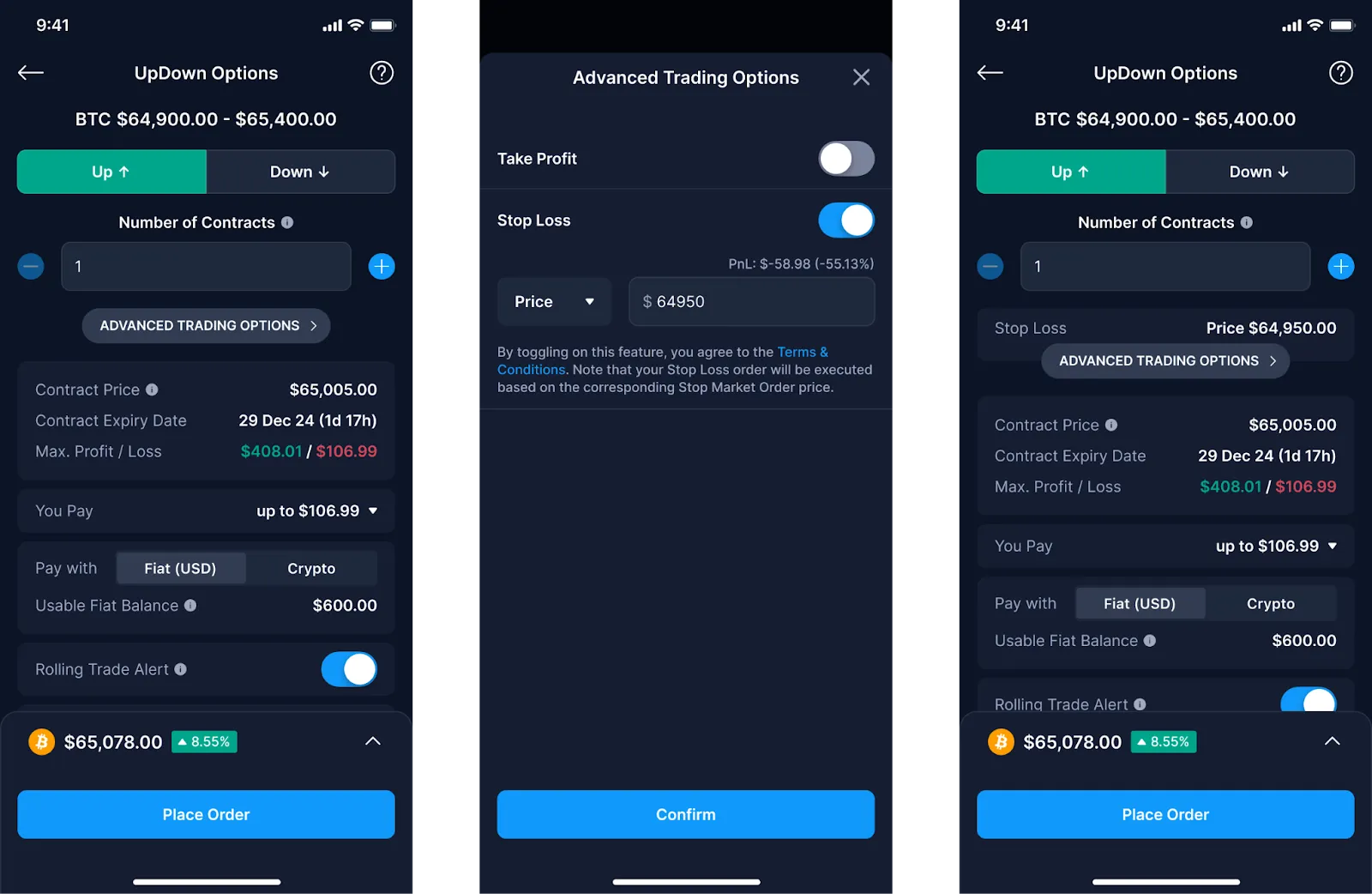
If you wish to add or amend a take-profit or stop-loss level after a position is created, you can do so by managing your open position:
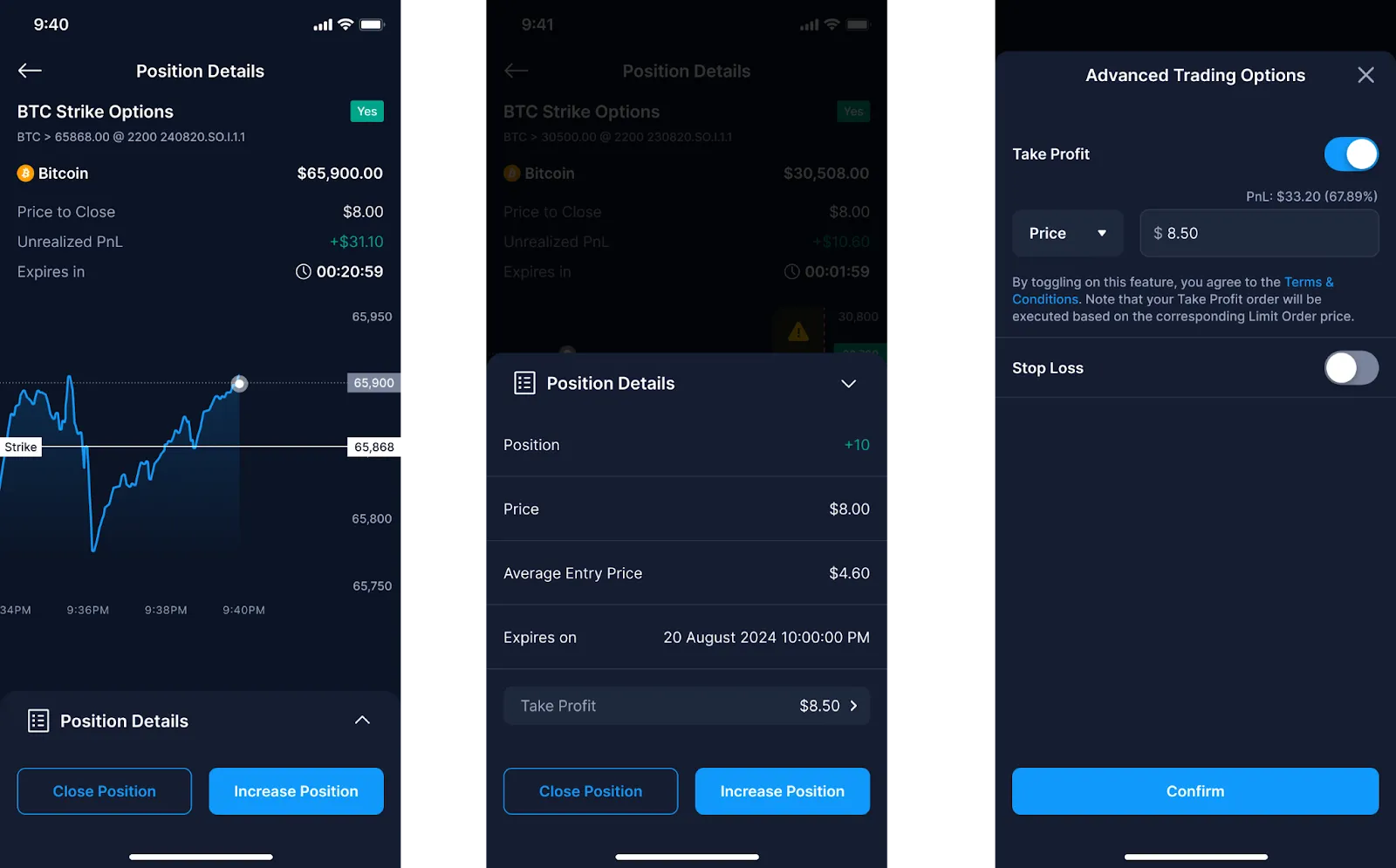
Also check out our Take Profit FAQs and Stop Loss FAQs for more details on Strike Options.
You can also set stop-loss or take-profit orders for an UpDown Option in the Crypto.com App in a similar way (currently only available in the US):
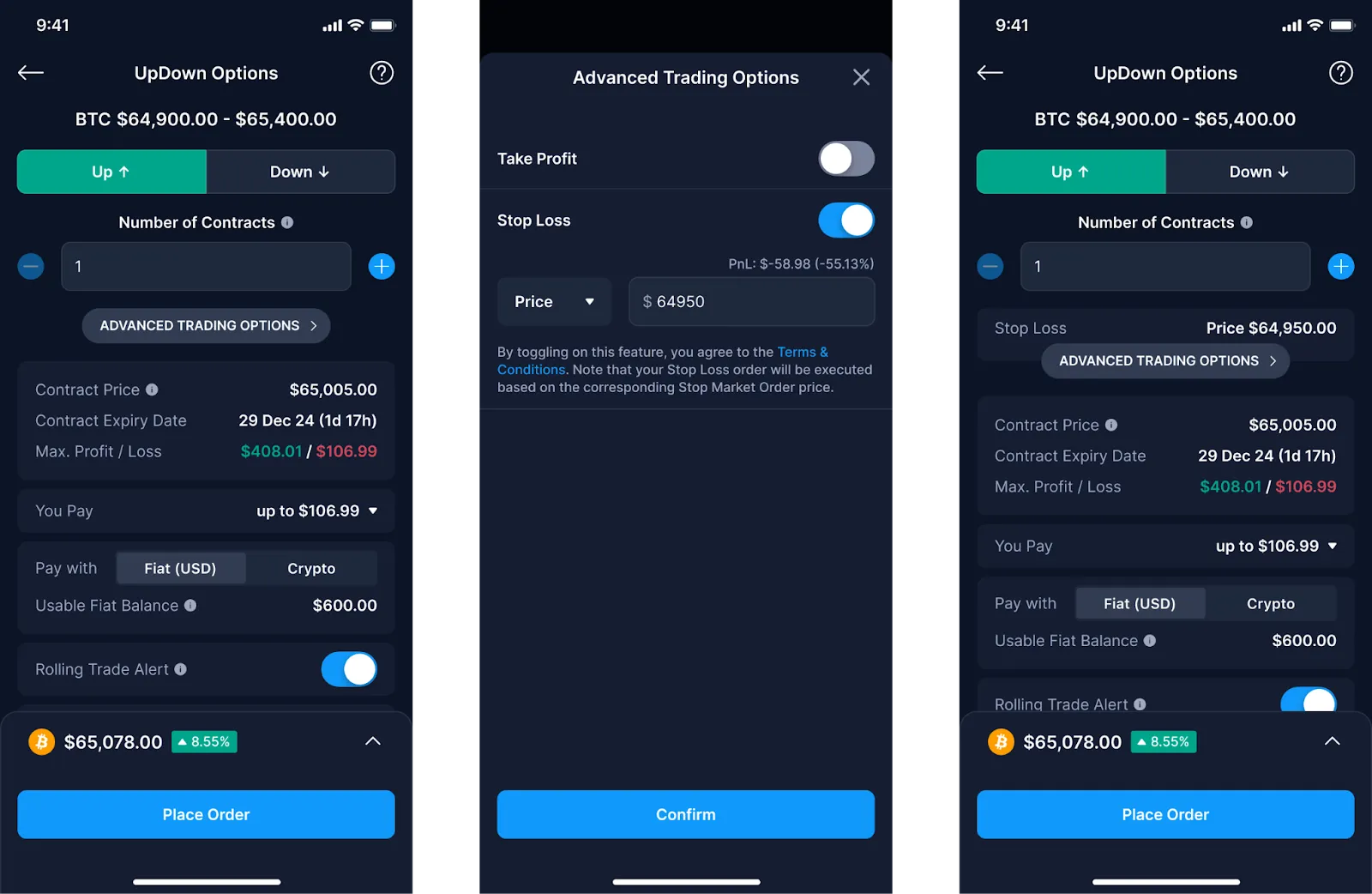
If you wish to add or amend a take-profit or stop-loss level after a position is created, you can do so by managing your open position:
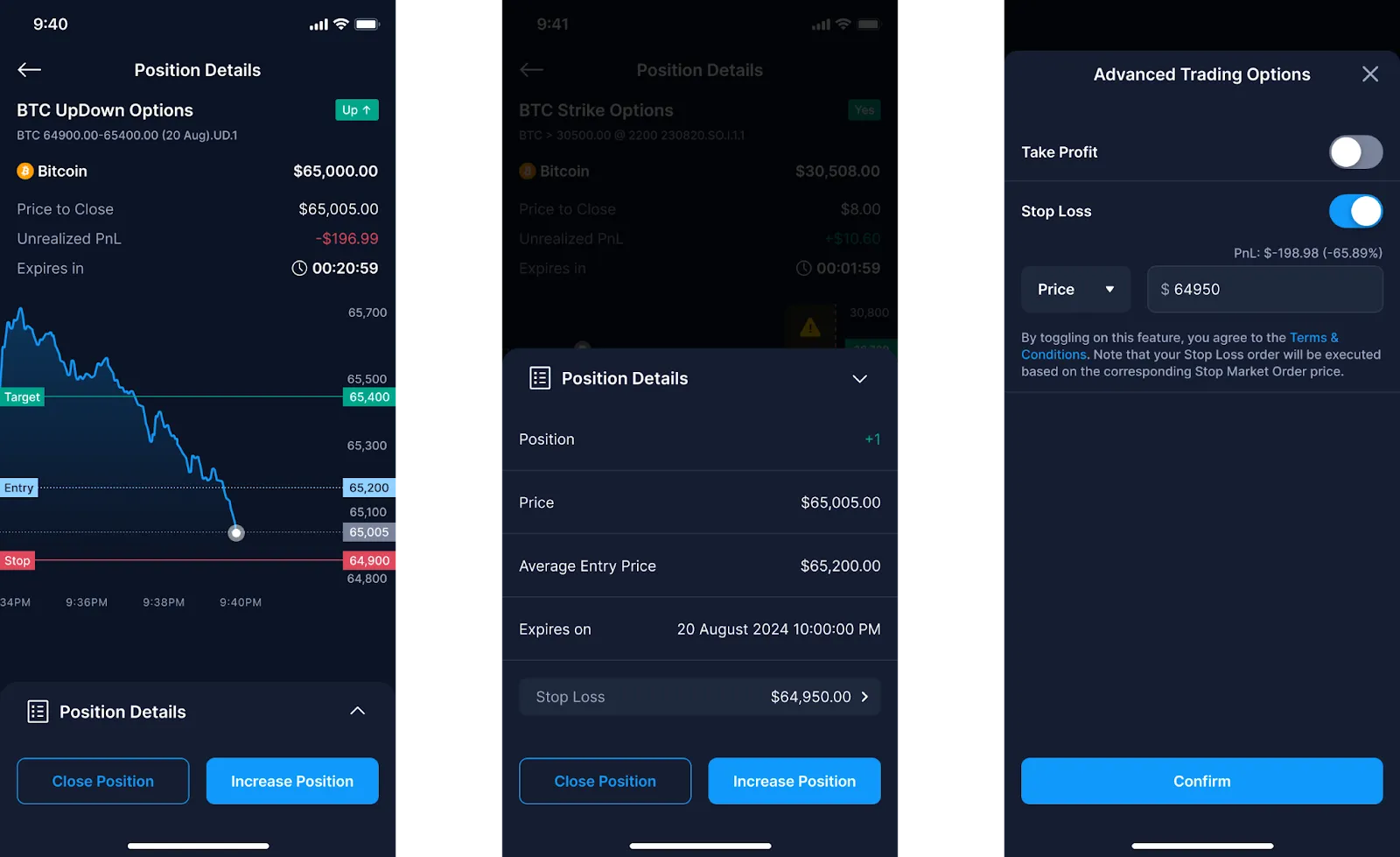
Also check out our Take Profit FAQs and Stop Loss FAQs for more details on UpDown Options.
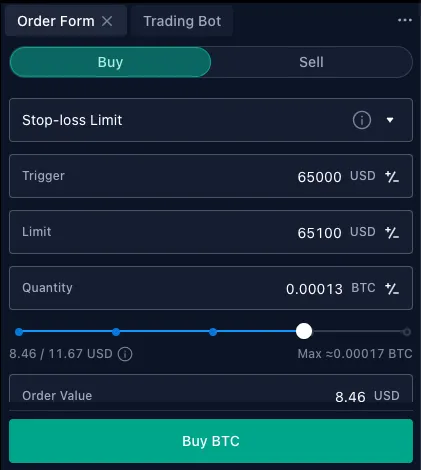
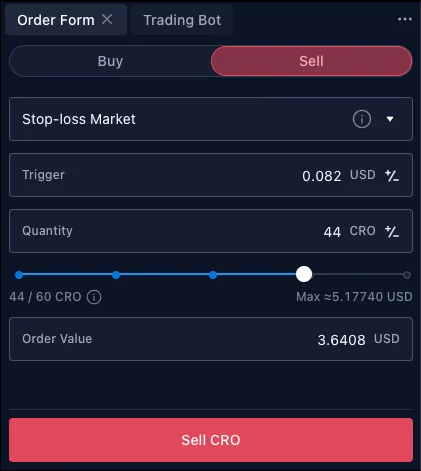
Stop-loss orders are also available on the Exchange. Users can select between a Stop Limit or Stop Market order.
Here’s how it works:
1. For a long position, you can set a ‘Sell Stop-Loss Limit Order’. The stop order becomes a sell-limit order when the mark price drops to the trigger price. The limit order is executed if the mark price hits the limit price. This lets you close the position at your limit price or better. You can also set a ‘Sell Stop-Loss Market Order’. The stop order becomes a sell-market order and is executed immediately at the next available price when the mark price drops to the trigger price.
2. For a short position, a ‘Buy Stop-Loss Limit Order’ becomes a buy-limit order when the mark price rises to the trigger price. The order is executed if the mark price hits the limit price. A ‘Buy Stop-Loss Market Order’ executes a buy-market order at the next available price when the market price rises to the trigger price.
How to set stop-loss orders:
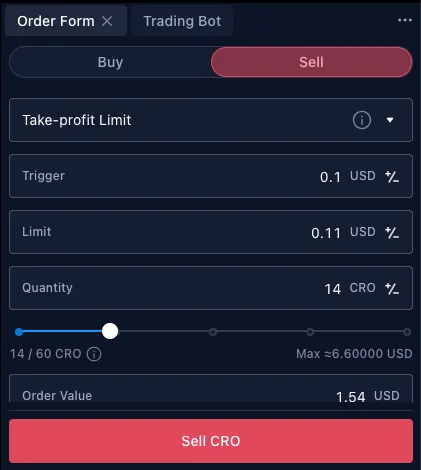
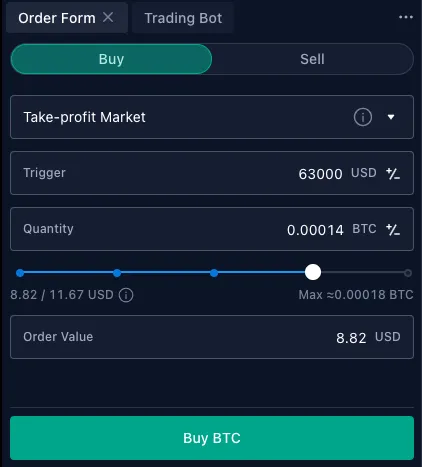
Take-profit orders are also available on the Exchange as Conditional Limit or Market orders.
Here’s how it works:
1. For a long position, you can set a ‘Sell Take-Profit Limit Order’. The stop order becomes a sell-limit order when the mark price rises to the trigger price. The limit order is executed if the mark price hits the limit price. This lets you close the position at your limit price or better. You can also set a ‘Sell Take-Profit Market Order’. The stop order becomes a sell-market order and is executed immediately at the next available price when the mark price rises to the trigger price.
2. For a short position, a ‘Buy Take-Profit Limit Order’ becomes a buy-limit order when the market price falls to the trigger price. The order is executed if the mark price hits the limit price. A ‘Buy Take-Profit Market Order’ executes a buy-market order at the next available price when the market price falls to the trigger price.
How to set take-profit Orders:
For more info, check out this detailed step-by-step guide on take-profit and stop-loss orders on the Crypto.com Exchange.
It’s important to actively manage both stop-loss and take-profit orders throughout the trade’s lifespan. As the market environment changes and crypto tokens make large moves, factors to consider include managing the orders to:
Maintain a favourable risk/reward ratio. If the token moves significantly in the trader’s favour, they could raise the stop-loss to potentially lock in more profits. For example, a stop-loss targeting a $5 loss, combined with a take-profit targeting a $10 gain, effectively means a risk/reward ratio of 2 times (in other words, risking $5 for a $10 gain) — typically, a ratio of above 1 time would be the minimum requirement.
Adjust to new support and resistance levels. Stop-losses can be adjusted to new support levels and take-profits to new resistance levels that emerge.
React to key events. If important news that impacts the token or broader market emerges, stops and targets can be tightened to reduce risk.
Limit losses during volatile periods. Stop-losses can be widened during periods of high volatility to avoid unnecessary exits due to temporary price fluctuations. Similarly, wider stops may be used for tokens that are more volatile, and narrower stops for more stable tokens.
Take gains if momentum slows. Profits may be taken earlier if the token’s rally shows signs of fizzling out, before gains fully evaporate.
By setting appropriate, but flexible, stop-loss and take-profit levels and managing them actively, traders can potentially improve their risk-adjusted returns over time in any trading strategy. Though they require discipline and constant monitoring, these simple risk management tools can help make a difference in trading results.
It is worth repeating that the discipline to actually adhere to the stop-loss and take-profit levels is paramount — after all, they are not helpful if the trader sets these levels but then doesn’t actually use them.
Setting appropriate stop-loss and take-profit levels is essential for risk management when trading. Stop losses can cut losses short, while take profits can lock in gains. Traders identify stop-loss levels typically based on price percentages or fixed prices that can be informed by technical indicators. Active management of stop-loss and take-profit orders and having the discipline to adhere to them are key considerations.
Crypto.com users can easily set stop-loss and take-profit levels for trading positions on the Crypto.com Exchange, as well as for Strike and UpDown Options, giving users the opportunity to automate and protect their trades.
Important information:This is informational content sponsored by Crypto.com and should not be considered as investment advice. Trading cryptocurrencies carries risks, such as price volatility and market risks. Before deciding to trade cryptocurrencies, consider your risk appetite. Services, features and other benefits referenced in this article may be subject to eligibility requirements, token holdings, and may change at the discretion of Crypto.com.
Past performance may not indicate future results. There's no assurance of future profitability, and content may not reflect current opinions.




