







Introducing cdcx-cli: Terminal-Native Trading for Humans, Developers, and AI Agents
Trade Crypto.com Exchange with a full interactive TUI, a scriptable CLI, and a native MCP server.
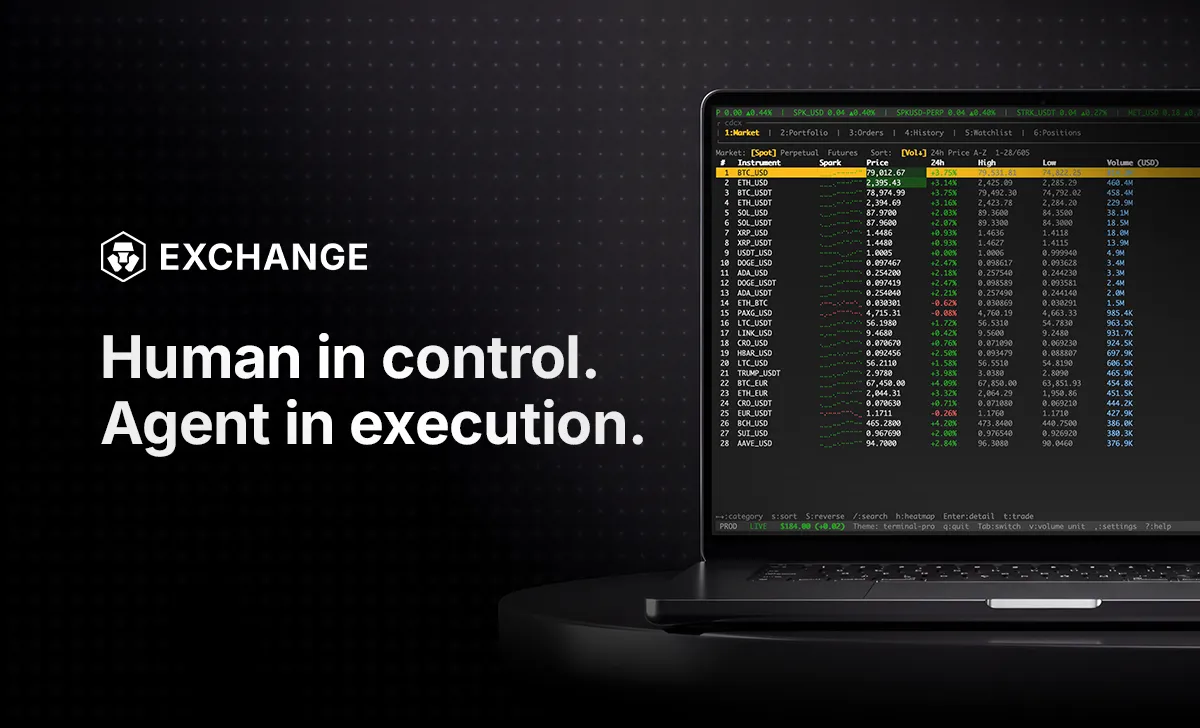
Crypto.com Exchange has officially launched cdcx-cli, an open-source command-line interface designed to make the full Exchange trading surface available to AI agents and developers - natively, from the terminal where they already live.
AI coding agents like Claude Code, Cursor, Codex, and OpenClaw operate in the file system and the terminal. They cannot click buttons in a web UI. cdcx-cli was built specifically for this reality.
Three Interfaces, One Binary
1. Interactive TUI (cdcx tui)
Designed for power users who prefer a keyboard-driven workflow over a browser. cdcx-cli is one of the first in its category to offer a full visual dashboard in the terminal.
- Six-Tab Navigation: Toggle between Market, Portfolio, Orders, History, Watchlist, and Positions.
- Terminal Graphics: Rendered inline sparklines, candlestick charts (k), and heatmap views (h).
- Instant Execution: Hotkeys to search (/) and trade (t) allow you to move from analysis to execution in milliseconds without leaving the TUI.
- Portfolio Visibility: Get a full account summary and open positions with one-line commands.
- Zero-Dependency Install: A single binary install that works across macOS, Linux, and Windows (via WSL).
2. Scriptable CLI for Developers (cdcx trade, cdcx market)
If you’re building automation by hand, cdcx-cli is designed for UNIX-style piping and high-frequency workflows.
- Machine Readable: Every command supports structured JSON or NDJSON output (-o json), making it trivial to pipe data into jq or feed it directly into an LLM's context window.
- Real-time Data: Use cdcx stream to access low-latency WebSocket feeds for tickers, order books, and trade events.
- Paper Trading: Test complex algorithmic strategies against live market data with zero financial risk using the built-in cdcx paper engine.
- Advanced orders: full support for OCO (One-Cancels-the-Other) and OTOCO
3. Built-in MCP Server (cdcx mcp)
AI agents live in the terminal and the file system; web UIs are slow and brittle for them. By shipping a native Model Context Protocol (MCP) server, cdcx-cli becomes a self-describing plugin for AI tools like Claude Code, Cursor, Codex, and OpenClaw.
- Autonomous discovery: your agent auto-introspects every available command, parameter, and type
- Zero boilerplate: the agent executes trades or monitors positions based on natural language prompts, with no custom API wrapper
- No infrastructure overhead: no HMAC signing, no nonce management, no hand-rolled WebSocket heartbeats
Trade RWA Perpetuals 24/7
With the recent launch of U.S. Index perpetuals on the Crypto.com Exchange, you can now trade perpetuals tracking traditional markets like SPY (S&P 500) and QQQ (Nasdaq-100) around the clock.
cdcx-cli makes this bridge seamless. No brokerage account, no market hours, and no UI overhead. Access the world's most liquid indices with one command: cdcx trade order BUY SPYUSD-PERP 10
Interactive TUI for Human Power Users
If you prefer to drive the Exchange from a keyboard yourself, run cdcx tui to launch a full six-tab trading dashboard in your terminal: Market, Portfolio, Orders, History, Watchlist, and Positions, with inline sparklines, candlestick charts, heatmap view, search, and trade-from-TUI hotkeys. No browser required.
Getting Started
Install cdcx-cli in seconds:
Bash
Try these commands:
- cdcx tui - Launch the interactive dashboard.
- cdcx mcp — start the MCP server for your AI agent
- cdcx market ticker SPYUSD-PERP - View real-time RWA prices.
- cdcx account summary - Check your balances.
Disclaimer: Product availability subject to jurisdictional limitations. Trading digital assets and derivatives involves risk and may result in the loss of capital. Crypto.com reserves the right to modify or discontinue product features at its discretion. Please review the applicable Terms and Conditions before trading.
Share with Friends
Related Articles
Introducing the Upgraded OTC Trading Suite on the Crypto.com Exchange
Crypto.com App and Exchange to Support the Merit Circle (MC) Token Swap and Rebranding to Beam (BEAMX)
Ready to start your crypto journey?
Get your step-by-step guide to setting upan account with Crypto.com
By clicking the Submit button you acknowledge having read the Privacy Notice of Crypto.com where we explain how we use and protect your personal data.